Syncing Profiles
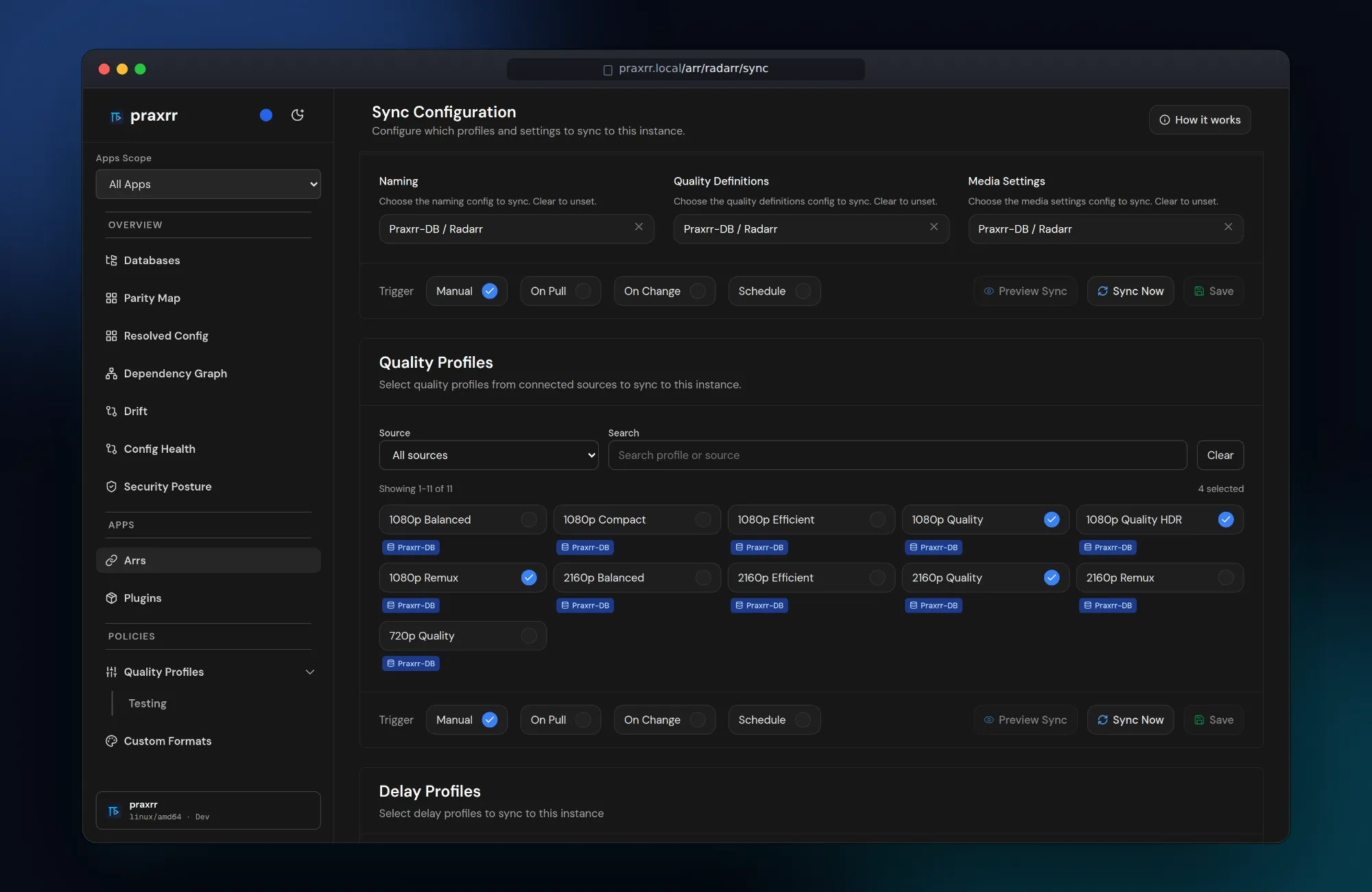
Sync pushes compiled PCD configuration to connected Arr instances. Each instance has independent sync selections, triggers, and preview state per section.
Sync sections
Section titled “Sync sections”Depending on arr_type, an instance may expose:
- Quality profiles (with dependent custom formats)
- Delay profiles
- Media management
- Metadata profiles (Lidarr)
Open Arr → {instance} → Sync to enable profiles from each linked PCD and configure when pushes run.
Sync triggers
Section titled “Sync triggers”Each section supports a trigger mode:
| Trigger | When sync runs |
|---|---|
on_change |
After local PCD or selection changes |
on_pull |
After the PCD repository is pulled |
schedule |
On a cron expression (UTC) |
Scheduled syncs use standard cron syntax (for example 0 * * * * hourly).
Praxrr evaluates schedules during the job processor cycle.
Optional startup pull (PULL_ON_START=true) reconstructs selections from live
Arr state without immediately overwriting remote configuration.
Preview before apply
Section titled “Preview before apply”Sync Preview generates a read-only diff between desired PCD state and the current Arr API state:
- On the Sync page, open the preview panel.
- Praxrr fetches remote entities and compares field-level changes.
- Review summary counts: creates, updates, deletes, unchanged.
Preview runs per section (quality profiles, delay profiles, etc.). Quality profile preview includes custom formats referenced by selected profiles.
Preview does not modify Arr. Use it as a dry-run gate before Apply Preview, Sync now, or enabling aggressive triggers.
Apply the reviewed preview
Section titled “Apply the reviewed preview”Apply Preview authorizes only what you reviewed: the displayed instance and Arr family, the eligible sections you selected, their effective configuration, and the underlying desired PCD and live Arr evidence. Praxrr keeps the corresponding review binding privately in memory for the preview’s limited lifetime; it is not durable across a restart.
Before anything is written, Praxrr:
- Claims the preview and all selected sections so another sync cannot take over that reviewed work.
- Reloads the exact instance and dispatches explicitly as Radarr, Sonarr, or Lidarr.
- Rebuilds the PCD/config evidence, live Arr evidence, and material plan separately for every selected section.
- Confirms every selected section still matches the review before allowing the first write.
If any selected evidence changed or cannot be verified, the entire apply stops with zero writes. The alert names the affected evidence class and sections, says that nothing was applied, and keeps the old diff visible as read-only evidence. Choose Generate a new preview, review the replacement diff, and apply that new preview instead. An invalidated preview cannot be retried.
The entries in a preview are planned changes. After a matched apply begins, confirmed outcomes show what Arr actually accepted, skipped, or failed and may link to Sync History. Planned changes and confirmed outcomes are deliberately displayed separately; a plan is never treated as proof that a remote write happened.
Praxrr validates all selected sections before its first write, but the supported Arr APIs do not provide one shared transaction or conditional-write mechanism. A separate external Arr editor can still race between Praxrr’s final read and write. If you expect concurrent edits, coordinate them and generate a fresh preview immediately before Apply.
Pruning removed entities
Section titled “Pruning removed entities”When you remove a custom format or quality profile from your database, sync normally just stops pushing it — the copy already in Arr stays behind. Pruning is an opt-in, per-instance policy that deletes those leftovers, but only the ones Praxrr itself created.
What the ownership ledger records
Section titled “What the ownership ledger records”Praxrr keeps an ownership ledger per instance. A row is written only when a sync creates a custom format or quality profile on that instance. A successful update merely refreshes the existing row — it never adopts an entity Praxrr did not create. Anything you made by hand in Arr is never recorded and never pruned.
The ledger starts empty and there is no backfill: custom formats and profiles that already existed in Arr before this feature (or before you connected the instance) stay unmanaged forever. To find and remove those, use the instance’s Cleanup tool with Include unmanaged items turned on.
Enabling pruning
Section titled “Enabling pruning”Pruning is off by default. Enable it per instance under Arr → {instance} → Settings with the Prune removed managed entities toggle.
When deletions happen
Section titled “When deletions happen”Deletes run only when you apply a reviewed sync preview. You always see the exact list of deletions first:
- Ledger-owned items that will be removed appear as Managed — will be deleted.
- Items Praxrr did not create appear as Left in Arr. They are not removed.
- A quality profile that is still assigned to media, or whose media use could not be checked, appears as Managed — kept (in use) and is listed under Kept (in use).
Scheduled, on_pull, on_change, and canary syncs never delete. Applying the
sections that contain managed deletions also requires an API token with the
admin scope; a sync-only token can still apply other sections in the same
preview.
What is kept
Section titled “What is kept”Praxrr does not delete a quality profile that is still assigned to media. On a reviewed preview it checks the library before planning that delete. Drift checks and other non-reviewed previews do not download the library; those profiles stay listed as kept because their use was not verified.
A custom format that any remaining quality profile still scores is kept. It is not listed under Kept (in use); it is simply not deleted. That includes a format scored by a profile this apply did not remove. Quality profiles are deleted before custom formats, so a format referenced only by a profile removed in the same apply can still be pruned.
Before each delete, Praxrr reads the live entity again. If the name no longer matches, the item is left in place. If Arr already removed it, the delete counts as done.
Housekeeping
Section titled “Housekeeping”- Changing an instance’s URL or type clears its ledger, since the recorded remote ids no longer refer to the same server. Pruning starts fresh from the next creates.
- Planned managed deletions also show on the Drift pages as Pending removal. This includes Praxrr-created quality profiles that are blocked because they are still assigned to media or because their usage could not be verified. They are not deleted until a reviewed preview confirms they are unused.
- The Cleanup tool scans only ledger-managed items by default; toggle Include unmanaged items to scan everything.
Run a sync
Section titled “Run a sync”- Sync now on a section pushes pending changes immediately.
- Save persists selection and trigger changes without syncing.
- Background jobs process pending syncs with bounded concurrency across instances.
The sync pipeline for each section:
- Fetch selected entities from the compiled PCD cache.
- Transform to Arr-specific API payloads.
- Push creates, updates, and deletes through the Arr REST client.
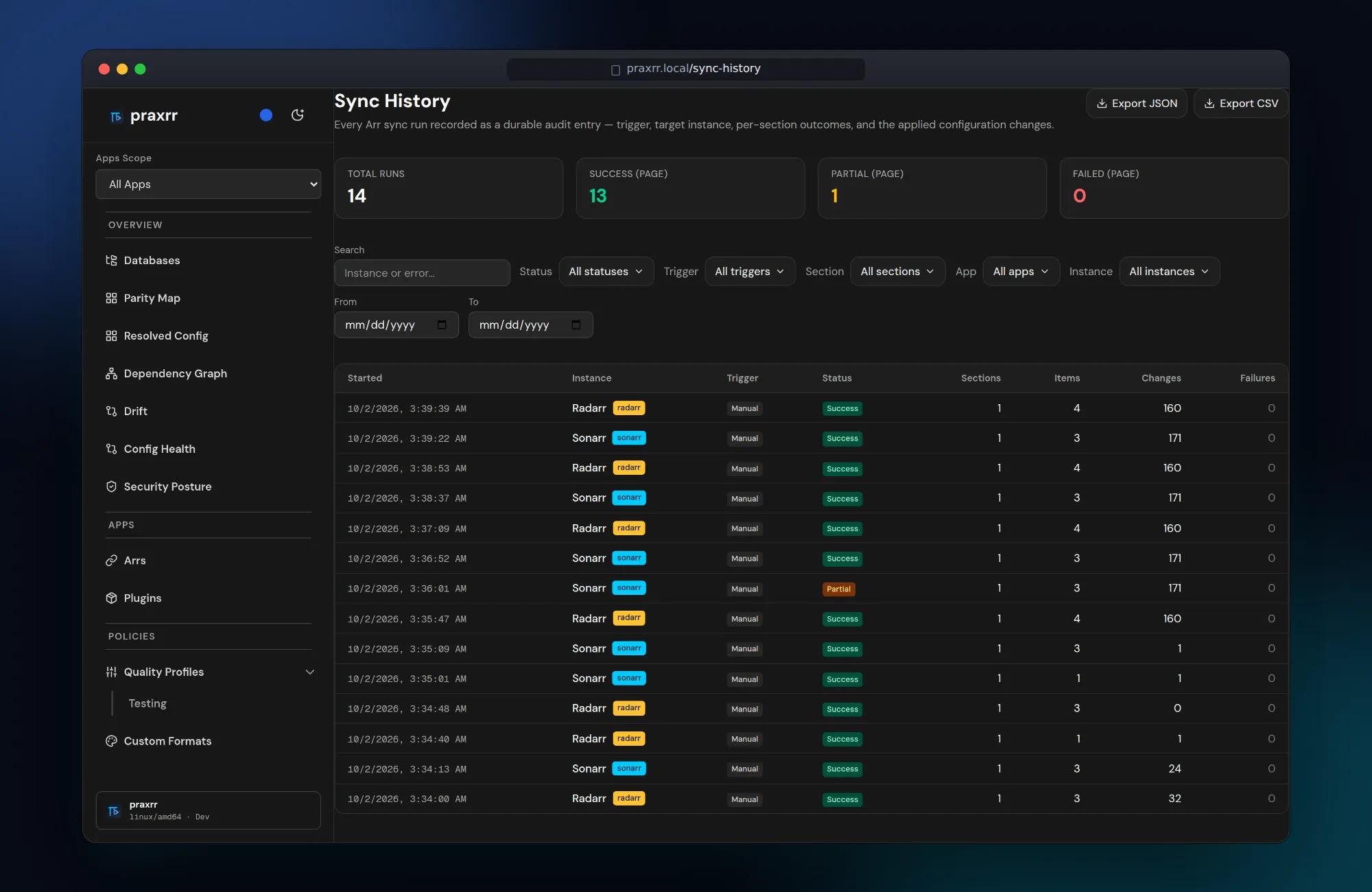
Logs for each run appear under Arr → {instance} → Logs. Sync History keeps a durable, exportable audit entry for every run across all instances.
Live progress
Section titled “Live progress”The sync page updates on its own while a job runs; you do not need to reload.
- Section chip: each section’s footer shows Queued when a sync is waiting, Syncing… while it runs, and Last sync failed when the most recent run failed.
- Completion toasts: when a job finishes, a toast reports the result with a View details link to its Sync History entry or to Settings → Jobs. Failure toasts stay until you dismiss them.
- Which jobs toast: jobs you start manually always toast. Background sync failures toast too, at most one per minute for each job type and target (instance or database). A toast for a repeated failure replaces the previous one instead of stacking. Successful background runs stay quiet.
- Connection indicator: if the live connection drops, a small Reconnecting… indicator appears. If Praxrr cannot reconnect, it shows Live updates paused. Pages keep working without live updates; reload or navigate to see the latest state.
Base ops vs user ops
Section titled “Base ops vs user ops”PCD state has two layers:
- Base ops: Published canonical state from the linked repository. Updated when you pull upstream changes.
- User ops: Local overrides that persist across pulls. Stored as append-only
SQL operations in
pcd_ops.
When upstream base ops change the same field you edited locally, Praxrr uses value guards to detect conflicts. Resolve conflicts on the database Changes or Conflicts pages before expecting sync to apply cleanly.
Pull upstream changes
Section titled “Pull upstream changes”When the PCD remote has new commits:
- Open Databases → {database} and pull or sync the repository.
- Review Changes for diffs against your local user ops.
- Resolve conflicts if prompted.
- Re-run Preview on affected instances before syncing.
Non-Git local-path PCD sources skip commit history features but still support entity editing and sync.
Conflict resolution
Section titled “Conflict resolution”If sync fails because remote Arr state diverged:
- Check the reviewed-preview alert or preview errors for the affected evidence and section.
- Compare PCD Changes with Arr UI state.
- Adjust user ops or Arr selections, then generate and review a new preview.
Avoid blind force-syncing over manual Arr edits you intend to keep.
Next steps
Section titled “Next steps”- Quality Profiles — profile structure and scoring
- Custom Formats — format entities synced with profiles
- Troubleshooting — sync error messages